Physical Address
304 North Cardinal St.
Dorchester Center, MA 02124
Physical Address
304 North Cardinal St.
Dorchester Center, MA 02124

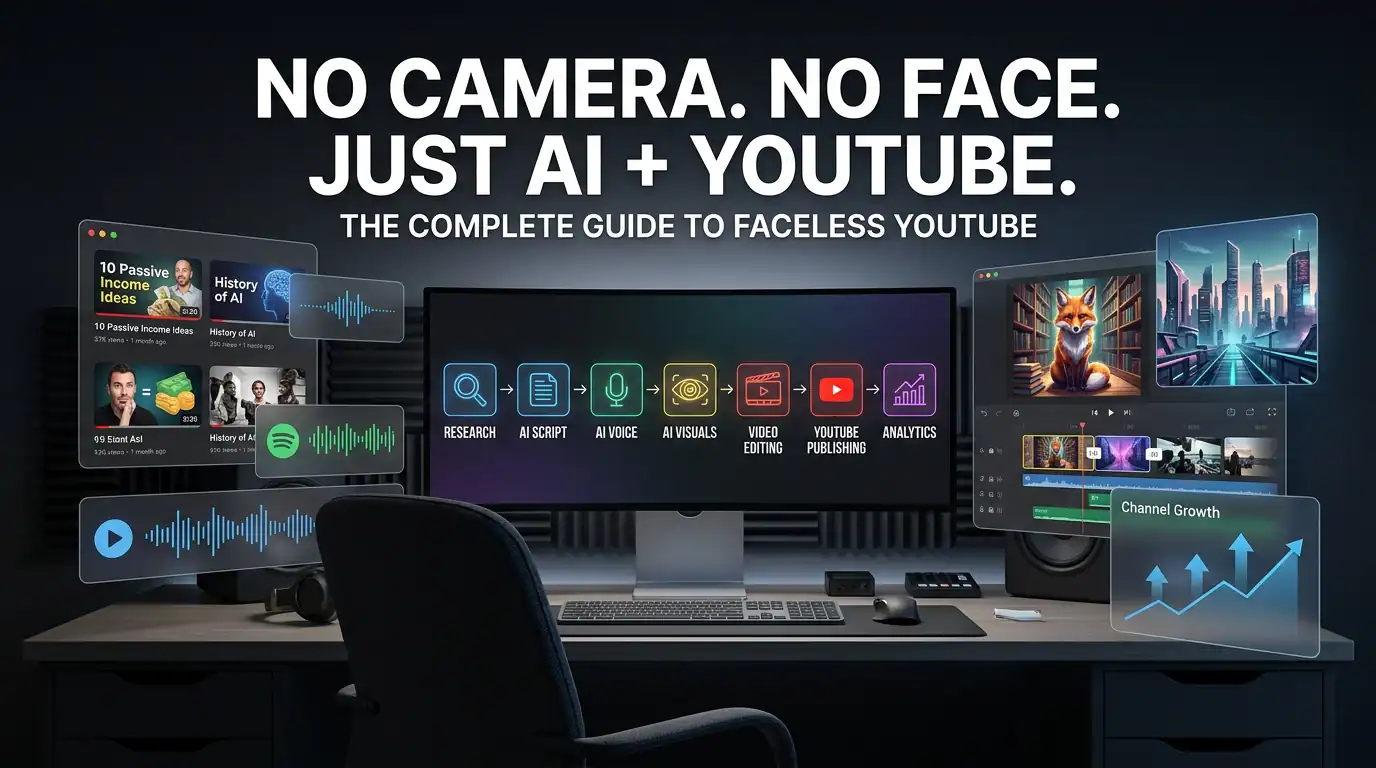
What if you could build a history YouTube channel without standing in front of a camera, renting a studio, or spending hours filming yourself? With the right AI tools for faceless YouTube channels, you can research topics, develop scripts, create narration, produce visuals, edit videos, and build a repeatable publishing workflow without showing your face. But there is an important difference between using AI to build a real content business and simply flooding YouTube with automatically generated videos.
A successful faceless history channel still needs something AI cannot reliably provide on its own: human judgment.
You need to verify historical facts, choose worthwhile stories, create an engaging narrative, review AI-generated visuals, check pronunciation, understand copyright, and make sure every finished video provides genuine value to viewers.
That is why this guide takes a different approach.
Instead of giving you a long list of AI software and telling you to automate everything, we will build the entire system step by step. You will see how AI tools for faceless YouTube channels can fit into research, scripting, narration, visual creation, editing, thumbnails, publishing, and optimization.
You will also learn how to build faceless YouTube channels without turning your content into repetitive, low-value AI videos.
Most importantly, the goal is not to create an “AI content farm.”
The goal is to create a quality-controlled history channel where AI handles repetitive production work while you remain responsible for research, accuracy, storytelling, and final decisions.
A faceless history YouTube channel is a YouTube channel where the creator does not appear on camera. Instead, the videos tell historical stories through narration, images, maps, animations, archival material, screen graphics, video clips, music, sound effects, and other visual storytelling techniques.
You do not need to be a professional filmmaker to start.
You also do not need an expensive camera setup.
The basic production model can look like this:
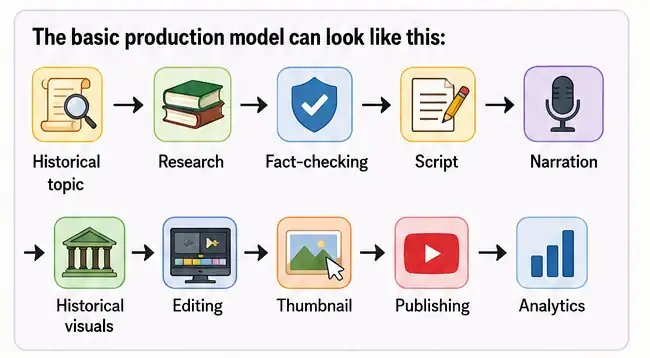
AI can assist with several stages of this process.
For example, AI can help organize research notes, brainstorm historical video ideas, develop an initial script, generate narration, create visual concepts, remove audio problems, produce captions, and speed up editing.
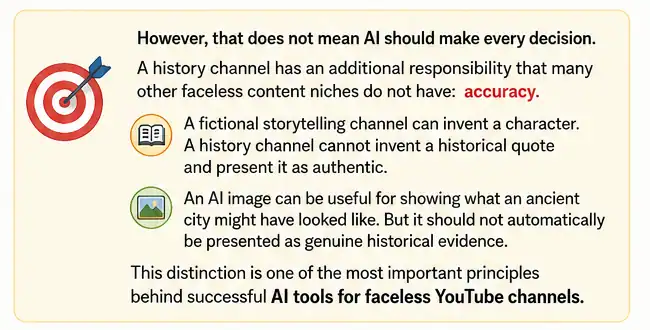
Faceless Does Not Mean Fully Automated
The word “faceless” only describes the presentation style.
It does not mean the creator should disappear from the entire production process.
In fact, some of the best faceless YouTube channels can involve significant human work behind the scenes.
You may never appear on screen, but you can still provide:
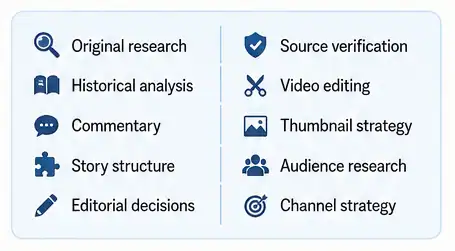
That human layer is what can turn AI-assisted production into a real content business.
Producing a documentary-style history video traditionally involves many separate tasks.
You might spend hours researching a subject, writing a script, recording narration, finding images, searching for footage, editing audio, creating graphics, designing a thumbnail, and preparing the final upload.
AI can reduce the amount of repetitive work involved in several of those stages.
That is the real opportunity behind AI tools for faceless YouTube channels.
AI can help you move from:
“I have an idea for a video.”
to:
“I have a repeatable production system.”
But speed alone is not enough.
If AI allows you to produce five videos instead of one, but all five contain weak research, generic scripts, repetitive visuals, and inaccurate information, you have simply created five problems faster.
The better objective is:
Use AI to increase production efficiency while maintaining or improving content quality.
This approach also fits YouTube’s current direction. YouTube says creators can use generative AI for production assistance such as outlines, scripts, thumbnails, titles, infographics, captions, idea generation, and other workflow tasks without those uses automatically requiring an AI disclosure. However, realistic AI-generated or meaningfully altered content can require disclosure when it could mislead viewers about real people, events, or places.
That distinction matters when building history-focused faceless YouTube channels.
Yes, it can be worth exploring if you approach it as a long-term content business rather than a quick-money shortcut.
History has several characteristics that make it interesting for YouTube creators.
Historical subjects can remain relevant for years.
A well-produced video about the Roman Empire, an important battle, an ancient civilization, a famous inventor, or a forgotten historical event does not necessarily become useless after a few weeks.
That gives history content an evergreen component.
At the same time, the niche is competitive.
There are already countless history channels, documentary channels, educational creators, animation channels, and AI-assisted publishers competing for viewer attention.
So simply creating “history videos” is not enough.
You need a reason for viewers to choose your video.
The Real Opportunity Is the Workflow
The opportunity is not:
“AI will make a complete documentary for me.”
The opportunity is:
AI can help a solo creator perform parts of a production workflow that previously required more time, equipment, or specialized skills.
That difference is important.
A creator using AI tools for faceless YouTube channels can potentially handle:
But the creator still needs to decide:
Those questions cannot be solved by simply adding more AI software.
The biggest mistake beginners make is confusing automation with value.
Imagine someone creates 100 history videos using the same process:
The creator may have produced 100 videos.
But quantity does not automatically equal quality.
The videos may have:
YouTube’s monetization policies specifically identify repetitive or mass-produced content as inauthentic content that can be ineligible for monetization. The policy also emphasizes original and authentic content.
That does not mean using AI automatically makes a channel ineligible.
It means the final content matters.
Your goal should therefore be to use AI as a production assistant rather than a replacement for the creator.
One of the most important decisions you will make is not which AI video generator to buy.
It is what type of history channel you want to build.
A broad channel called “History Facts” can quickly become difficult to differentiate.
A more specific positioning gives you a clearer audience, easier content planning, and a stronger reason for someone to subscribe.
Before you build your workflow with AI tools for faceless YouTube channels, choose a defined content direction.
Here are several possibilities.
Ancient History
Ancient history provides an enormous amount of material.
You could cover:
This niche works especially well with visual storytelling.
You can use maps, architectural reconstructions, illustrations, timelines, and carefully reviewed AI-generated scenes to help viewers visualize places that no longer exist in their original form.
For example, instead of creating a generic video called:
“10 Facts About Ancient Rome”
you could develop a stronger story:
“What a Normal Day in Ancient Rome Actually Looked Like”
The second concept creates a clearer viewer promise.
Military history is another large category.
Potential topics include:
This category can benefit from maps and animated timelines.
However, accuracy becomes especially important.
A wrong date, incorrect troop movement, inaccurate map, or invented quotation can damage the credibility of the entire video.
Your workflow should therefore include a formal fact-checking stage rather than treating AI output as the final source.
Historical mysteries can be attractive because curiosity naturally creates strong video hooks.
Possible topics include:
But this category comes with an important warning.
Do not confuse mystery with misinformation.
If historians have several competing explanations, explain that clearly.
Instead of saying:
“Scientists finally discovered the shocking truth.”
you can explain:
“Historians have proposed several explanations, but the evidence does not conclusively support one answer.”
That style is more trustworthy and gives you an opportunity to create genuinely informative storytelling.
This can be an excellent direction for a smaller creator.
Instead of competing directly with massive channels covering the most famous historical events, you can search for stories that have enough evidence to support a compelling documentary but are not already covered thousands of times.
Examples include:
This also gives you a powerful content formula:
“You probably haven’t heard of this…”
The important part is making sure the story actually deserves attention.
This category is particularly interesting for a Make Money Online website because it creates a natural bridge between history, entrepreneurship, technology, and money.
You could explore:
This category can also lead naturally into future content about entrepreneurship and online business.
For example:
“How Did This Company Go From a Small Idea to a Global Business?”
That is both historical and business-focused.
Another option is to build a channel around people.
You could cover:
Biography videos can work particularly well when you focus on a specific turning point rather than attempting to summarize an entire person’s life.
Instead of:
“The Complete Life of Thomas Edison”
consider:
“The Business Decision That Changed Thomas Edison’s Career”
The narrower story creates a stronger narrative.
You do not need to guess.
Score potential niches using five criteria:
| Factor | Question |
| Interest | Would you enjoy researching this topic repeatedly? |
| Demand | Are people actively searching for or watching it? |
| Competition | Can a new channel realistically differentiate itself? |
| Content Supply | Can you find enough reliable stories and sources? |
| Monetization | Does the audience have relevant products or services? |
You can score each category from 1 to 5.
For example:
| Niche | Interest | Demand | Competition | Content Supply | Monetization |
| Ancient History | 5 | 5 | 4 | 5 | 3 |
| Military History | 4 | 5 | 4 | 5 | 3 |
| Historical Mysteries | 5 | 5 | 4 | 4 | 3 |
| Business History | 5 | 4 | 3 | 5 | 5 |
| Biography | 4 | 4 | 4 | 5 | 4 |
These numbers are not a guarantee of search volume or revenue.
They are a decision-making framework.
The best niche is usually the intersection of audience demand, sustainable content production, your ability to differentiate, and your ability to create genuine value.
Once you choose a niche, you can select your AI tools for faceless YouTube channels.
Do not start by asking:
“What is the best AI video generator?”
Start by asking:
“What tasks do I need to complete to publish one excellent history video?”
That changes everything.
A complete production stack can include several categories.
Used to:
Used to:
Used to:
Used to create:
Used for:
Used to:
Used to:
The key is not to find one tool that supposedly does everything.
A better approach is to build a small, reliable stack where every tool has a specific job.
Your complete system can eventually look like this:
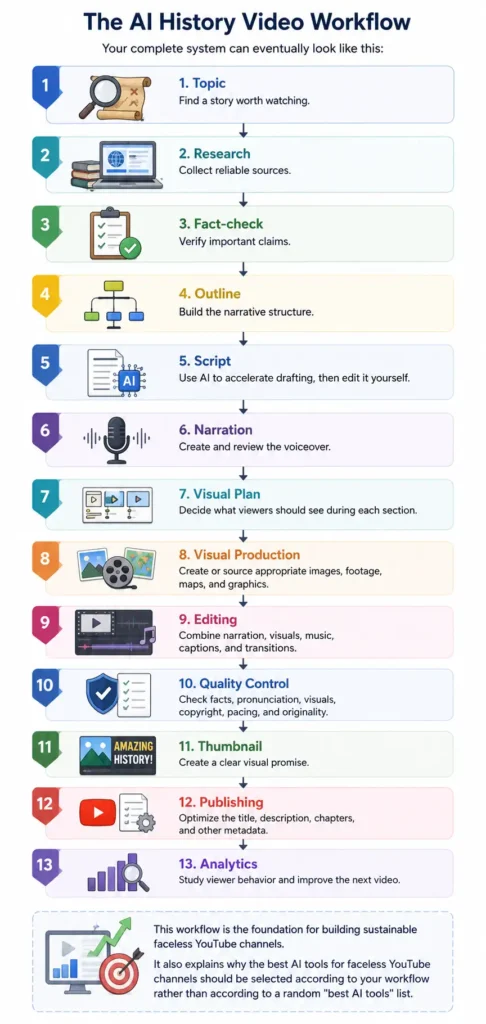
This principle should guide every video you produce.
But you remain responsible for deciding whether the final video is accurate and worth publishing.
That becomes especially important when an AI system produces information that sounds confident but is wrong.
A polished voiceover does not make an incorrect historical claim true.
A beautiful AI image does not make a reconstruction authentic.
A professional editing template does not make a video original.
The creator still needs to ask:
“Is this true?”
“Can I verify it?”
“Does this visual accurately represent what I’m claiming?”
“Does this video give viewers something useful that they could not get from a generic automated video?”
If the answer is no, go back and improve the content.
That mindset will separate your channel from the flood of low-effort faceless YouTube channels competing for attention.
And it is the foundation on which the rest of this guide will be built.
The most important stage of creating a history video is not generating the video.
It is getting the history right.
A viewer may forgive a transition that feels slightly awkward. They may even forgive an average thumbnail. But if your video confidently presents a false date, invented quote, incorrect battle detail, or fabricated historical claim as fact, you lose credibility.
That is why research should happen before scriptwriting.
When you use AI tools for faceless YouTube channels, the temptation is to ask an AI assistant for a complete script and immediately turn it into narration.
Avoid that workflow.
Instead, treat AI as a research assistant.
Your workflow should be:
Research → Source → Verify → Organize → Write → Review
The AI can help you move through these stages faster, but you should remain responsible for the final claims.
Don’t begin with a vague topic such as:
“Ancient Rome.”
That is a subject, not a video.
Turn the subject into a question.
For example:
A specific question gives your research a destination.
It also makes scriptwriting easier because every section can contribute toward answering the central question.
Use the One-Question Rule
Before researching, write one sentence:
“By the end of this video, viewers should understand ______.”
For example:
“By the end of this video, viewers should understand why the Roman city of Pompeii was destroyed and what archaeologists learned from its remains.”
Now you have a clear editorial objective.
Every fact, image, quote, and scene should support that objective.
Not every website deserves the same level of trust.
This becomes particularly important when using AI.
An AI system can combine information from multiple sources without clearly telling you which claims are well-supported and which are questionable.
Create your own source hierarchy.
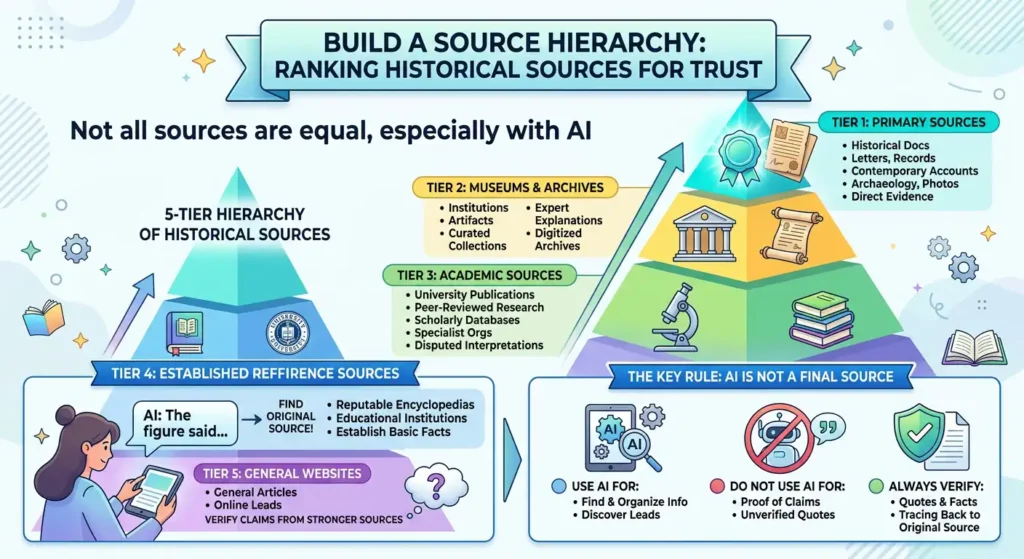
These can include:
Primary sources can provide direct evidence, although they still require interpretation and context.
Museums, libraries, national archives, and established historical institutions can be extremely valuable.
They may provide:
Look for:
These are particularly useful when the subject involves disputed interpretations.
Reputable encyclopedias, educational institutions, and established reference publications can help establish basic facts.
General articles can help you discover leads, but important claims should be traced back to stronger sources whenever possible.
AI Should Not Be Your Final Source
This is one of the most important rules in an AI-assisted history workflow.
Use AI to help you find and organize information.
Do not use an AI response itself as proof that a historical claim is true.
For example, if an AI tool tells you:
“This famous historical figure said…”
don’t immediately put the quotation into your script.
Find the original source.
If you cannot verify the quotation, don’t present it as a verified quote.
One of the easiest ways to improve your workflow is to create a simple research table.
You can use a spreadsheet with columns such as:
| Claim | Source | Source Type | Verified? | Notes |
| Event occurred in 79 CE | Museum/source | Institutional | Yes | Confirmed |
| Person held position X | Academic source | Scholarly | Yes | Cross-check |
| Exact cause of event | Multiple sources | Mixed | Partly | Debate exists |
| Famous quote | Original document | Primary | Yes | Exact wording verified |
This prevents an important problem.
You may remember where you found a fact while researching the video, but three weeks later you may not remember whether it came from an academic publication, a random blog, or an AI-generated summary.
A source table gives you a record.
It also makes future updates much easier.
You don’t necessarily need two sources for every basic statement.
But for important or surprising claims, independent verification is a useful standard.
For example:
Claim: A particular battle occurred on a specific date.
Check the date.
Claim: A historical figure made a famous statement.
Find the original quotation or a highly reliable scholarly source.
Claim: Historians believe an event happened for a particular reason.
Check whether historians actually agree.
This last point matters.
Sometimes the mistake isn’t that the event is false.
The mistake is presenting one interpretation as established fact.
Use language such as:
That gives your audience a more accurate picture of historical uncertainty.
AI-generated research can sound remarkably confident.
That is precisely why you need to verify it.
Common historical hallucinations include:
Incorrect Dates
An AI model may associate a person, event, or invention with the wrong year.
Invented Quotes
This is one of the most dangerous problems because quotation marks make a statement look authoritative.
Wrong People
Historical figures with similar names can be confused.
Incorrect Relationships
AI can incorrectly describe:
Invented Events
A model can combine real people, places, and events into a story that never happened.
Misinterpreted Evidence
A real archaeological discovery can be paired with an interpretation that researchers do not actually support.
False Precision
Be especially careful when AI gives extremely specific numbers, dates, quotations, or measurements without a source.
Precision does not equal accuracy.
This is where AI tools for faceless YouTube channels can provide enormous value.
Suppose you have collected 15 sources about an historical event.
Instead of manually organizing every note, you can use AI to help categorize them.
For example:
Prompt:
Organize these research notes into the following categories: timeline, people, locations, causes, major events, consequences, disputed claims, and direct quotations. Do not add information that isn’t present in the notes.
That final sentence is important.
You are telling the AI to organize your evidence rather than invent new evidence.
You can then ask:
Identify claims in these notes that require additional verification. Do not determine whether they are true. Simply flag them for review.
That is a much safer use of AI.
Once your research is verified, you can begin scripting.
This is where AI tools for faceless YouTube channels become especially useful.
AI can help you transform organized research into a coherent narrative.
But don’t simply write:
“Write a 10-minute history documentary about Ancient Rome.”
That approach gives the AI too much freedom.
Instead, provide:
Then ask the AI to work within those boundaries.
A history video needs more than facts.
It needs a reason to keep watching.
A useful structure is:
Give viewers a reason to care.
Explain what they need to know.
Introduce the problem, mystery, decision, or turning point.
Show what historians, documents, artifacts, or other sources tell us.
Answer the question you promised to explore.
This structure works particularly well for faceless YouTube channels because narration and visuals can continuously move the story forward without requiring the creator to appear on screen.
A generic AI-generated introduction might sound like:
“Throughout history, Ancient Rome was one of the most powerful civilizations in the world. In this video, we will explore its history, culture, and achievements.”
There is nothing technically wrong with the sentence.
But it does not create much curiosity.
A stronger approach might begin with a specific question:
“Imagine waking up in a Roman city nearly 2,000 years ago. What would you eat, where would you work, and what would happen if you couldn’t afford a private home?”
Now the viewer has a reason to continue.
The exact wording will depend on the topic and evidence, but the principle is the same:
Start with a question, conflict, surprise, or consequence—not a textbook introduction.
One of the biggest improvements you can make is changing the order of operations.
Don’t do this:
Topic → AI → Script
Do this:
Topic → Research → Verified notes → AI → Draft → Human review
That difference can dramatically improve the quality of the output.
Your AI prompt can contain:
Video Topic
The exact historical question.
Audience
For example:
Adults interested in accessible historical documentaries.
Verified Information
The facts you have already researched.
Source Notes
Where the information came from.
Structure
Hook → Context → Conflict → Evidence → Payoff.
Restrictions
For example:
Do not invent quotes, dates, people, locations, or historical events.
Uncertainty
Tell the AI which claims are disputed.
This gives your AI writing assistant a much safer information boundary.
You can develop a reusable prompt such as:
Create a documentary-style YouTube script from the verified research provided below. Use only information supported by the research. Do not invent quotations, dates, events, people, locations, statistics, or historical explanations. Clearly distinguish established facts from disputed interpretations. Build the story using Hook → Context → Conflict → Evidence → Payoff. Keep the narration conversational and accessible while preserving historical accuracy. Flag any statement that requires additional verification instead of guessing.
This type of prompt is much more useful than simply asking AI to “write a history video.”
It also gives you a reusable process that can be applied across multiple AI tools for faceless YouTube channels.
When the AI produces your first draft, don’t immediately copy it into your video editor.
Read it as an editor.
Ask:
Does the opening create curiosity?
If not, rewrite it.
Does every section move the story forward?
If not, remove unnecessary information.
Are there repeated ideas?
AI frequently restates the same point in slightly different words.
Remove them.
Does the script sound like a human?
Replace generic phrases.
Are historical claims supported?
Verify them.
Are quotations authentic?
Check them against reliable sources.
Does the conclusion answer the original question?
If not, restructure it.
The goal is not to make AI writing look more “AI-like.”
The goal is to make it sound like your channel.
Once the script is approved, narration becomes the next stage.
AI voice technology can make faceless production dramatically easier.
You don’t need to purchase a microphone, build a recording booth, or record every paragraph yourself.
However, choosing a voice is not simply about finding the voice that sounds most realistic.
For history content, the voice should match the subject.
A serious documentary about a major historical conflict may need a different narration style from a light educational video about everyday life in Ancient Rome.
This is one area where human review is essential.
AI voices can pronounce ordinary English perfectly while struggling with:
Listen to the entire narration before editing the video.
Create a pronunciation list for difficult terms.
For example:
| Term | Correct Pronunciation | Checked? |
| Historical figure | Verified | ✅ |
| Ancient location | Verified | ✅ |
| Foreign phrase | Verified | ✅ |
| Technical term | Verified | ✅ |
A beautiful AI voice saying a historical name incorrectly can immediately reduce the perceived quality of a documentary.
Visuals are where AI can become particularly powerful for AI tools for faceless YouTube channels.
History presents a unique challenge.
Many events happened before photography existed.
Others have limited surviving visual records.
You may need to show:
AI image generation can help fill some of these visual gaps.
But there is an important rule:
A generated reconstruction is not historical evidence.
It is a visual interpretation.
AI-generated images can be useful when you need to visualize something that cannot easily be filmed.
Examples include:
You can create an illustrative representation of what a city may have looked like.
For example:
Conceptual Scenes
AI can help visualize abstract ideas such as:
Establishing Shots
A generated landscape can help transition between sections of the story.
This is where historical channels need more care than generic faceless channels.
Suppose you ask an image generator to create:
“A realistic Roman marketplace in 100 CE.”
The image may look spectacular.
But it could include:
The image may still look convincing.
That is the problem.
Visual realism is not historical accuracy.
Therefore, review AI-generated historical imagery with the same skepticism you apply to AI-generated text.
You don’t have to choose between AI-generated imagery and archival material.
A stronger documentary can combine multiple visual formats.
For example:
Narration

Historical photograph
Map
AI reconstruction
Document excerpt
Archival image
Animated timeline
AI reconstruction
This variety makes the video feel more like a documentary and less like a slideshow.
It also helps you distinguish between:
What we know
and
What we are reconstructing.
That distinction is important for audience trust.
Don’t rely entirely on AI-generated images.
History is naturally visual.
Maps can explain:
Timelines can explain:
Diagrams can explain:
These visuals often communicate information more effectively than another AI-generated cinematic scene.
A useful production model for faceless YouTube channels is to divide visuals into three layers.
Use:
Purpose:
Show what we know.
Use:
Purpose:
Help viewers visualize what cannot be directly shown.
Use:
Purpose:
Help viewers understand the information.
Combining these three layers creates a much stronger documentary than simply placing random AI images behind narration.
You will find hundreds of tools marketed as the “best AI tools for faceless YouTube channels.”
Don’t choose software because an article says it is number one.
Choose it because it solves a specific production problem.
| Factor | Question |
| Purpose | What specific task does it solve? |
| Quality | Is the output good enough for publication? |
| Ease of Use | Can a beginner learn it quickly? |
| Speed | How much time does it save? |
| Cost | Does the price fit your production budget? |
| Commercial Rights | Can you use the output commercially? |
| Limits | Are there credits, minutes, or generation limits? |
| Consistency | Can you produce multiple videos with it? |
| Integration | Does it work well with the rest of your workflow? |
This prevents a common mistake.
You don’t need ten AI subscriptions.
One research system + one writing assistant + one voice solution + one visual solution + one editor + one thumbnail workflow.
The exact tools can change over time.
The workflow is more important than the brand names.
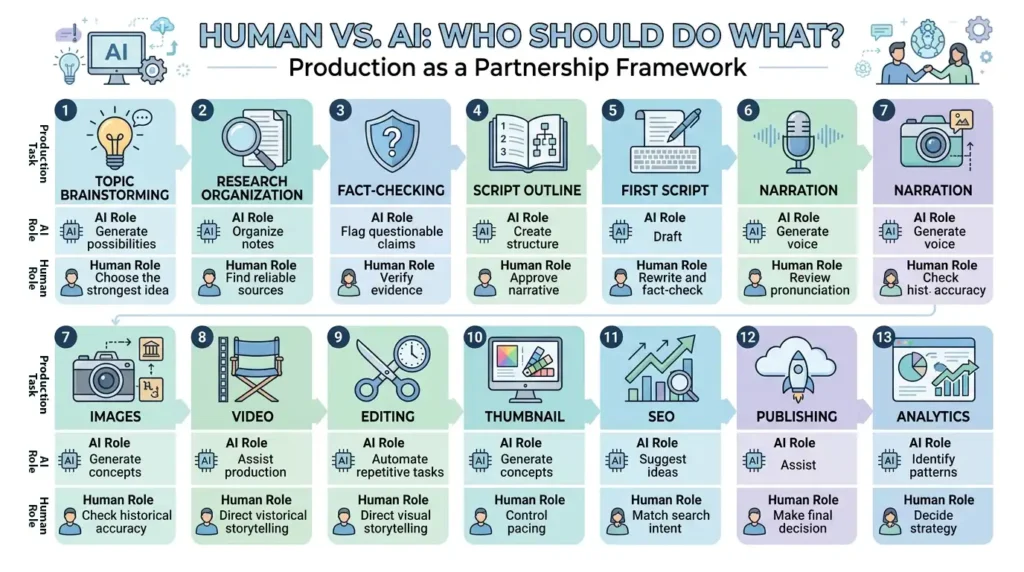
This is one of the most important frameworks in the entire article.
Think of your production process as a partnership.
| Production Task | AI Role | Human Role |
| Topic brainstorming | Generate possibilities | Choose the strongest idea |
| Research organization | Organize notes | Find reliable sources |
| Fact-checking | Flag questionable claims | Verify evidence |
| Script outline | Create structure | Approve narrative |
| First script | Draft | Rewrite and fact-check |
| Narration | Generate voice | Review pronunciation |
| Images | Generate concepts | Check historical accuracy |
| Video | Assist production | Direct visual storytelling |
| Editing | Automate repetitive tasks | Control pacing |
| Thumbnail | Generate concepts | Choose final design |
| SEO | Suggest ideas | Match search intent |
| Publishing | Assist | Make final decision |
| Analytics | Identify patterns | Decide strategy |
Notice the pattern.
AI is excellent at speed, repetition, transformation, and ideation.
Humans remain essential for judgment, verification, creativity, context, and responsibility.
That is the model you should build around.
Before any video goes live, ask ten questions.
1. Is every major historical claim verified?
If not, stop.
2. Did I accidentally present speculation as fact?
If yes, rewrite it.
3. Are all quotations authentic?
If you cannot verify one, remove it or clearly label the uncertainty.
4. Does the narration sound natural?
If not, adjust pacing, pauses, or the voice.
5. Are the visuals relevant?
Every visual should support what the narrator is saying.
6. Are AI reconstructions clearly treated as reconstructions?
Do not make viewers believe generated imagery is genuine archival evidence.
7. Is the video original?
Ask whether you added meaningful research, storytelling, analysis, editing, or perspective.
8. Are the visual and audio assets properly licensed?
Track commercial-use rights.
9. Does the first minute make viewers want to continue?
If not, improve the hook and pacing.
10. Would you personally recommend the video?
If the answer is no, don’t publish it yet.
This final question is surprisingly powerful.
Your goal isn’t to satisfy an AI content generator.
Your goal is to create something a real person would willingly watch.
At this stage, your workflow should look like this:
Choose a specific historical question
Research reliable sources
Build a fact-checking table
Verify important claims
Create the video outline
Give verified research to AI
Generate the first script draft
Human edit and fact-check
Generate narration
Review pronunciation
Create evidence-based and reconstructed visuals
Build maps, timelines, and explanatory graphics
Edit the video
Run the “Would I Publish This?” checklist
The next stage is turning this production system into a monetizable YouTube business.
That means understanding how YouTube evaluates AI-assisted content, how disclosure works, what monetization requirements matter, how to avoid repetitive content, what copyright risks exist, and how to calculate the real cost of producing each video.
Those topics are where many articles about AI tools for faceless YouTube channels become vague.
Your article should not.
It should show the reader exactly what happens after the video is produced—and how to turn the workflow into a sustainable channel.
One of the biggest questions people have before investing time into AI tools for faceless YouTube channels is simple:
The short answer is yes, it can.
But there is an important distinction between using AI as part of your production process and building a channel around mass-produced, repetitive content.
YouTube’s current monetization policies say creators should publish original and authentic content. The platform specifically identifies repetitive or mass-produced content as inauthentic content, which can be ineligible for monetization.
So the business opportunity is not:
Create hundreds of automated videos and hope YouTube pays you.
A much better strategy is:
Use AI to reduce production friction while creating original, useful, entertaining, and well-researched videos.
That distinction should guide your entire channel.
AI assistance does not automatically make a video ineligible for monetization.
YouTube’s current policies focus on whether the content meets its monetization requirements and whether it is original, authentic, and valuable rather than simply whether AI was involved in the production process.
That means you can use AI tools for faceless YouTube channels for tasks such as:
The important question is:
If you use AI to help produce a genuinely researched documentary with your own structure, editing, analysis, and storytelling, that is very different from automatically generating hundreds of nearly identical videos.
Think about it this way.
A camera doesn’t make a documentary valuable.
A microphone doesn’t make narration valuable.
Video-editing software doesn’t make a story valuable.
Likewise, AI doesn’t automatically make a YouTube video valuable.
The value comes from what you create with the technology.
This is why the strongest faceless YouTube channels should focus on:
If your goal is advertising revenue, you will eventually need to understand the YouTube Partner Program, commonly called YPP.
For the main YPP advertising-revenue threshold, YouTube currently lists two paths:
1,000 subscribers + 4,000 valid public watch hours during the previous 12 months
or
1,000 subscribers + 10 million valid public Shorts views during the previous 90 days.
Reaching those numbers does not automatically guarantee acceptance.
YouTube says channels still go through a review to determine whether they meet its policies and guidelines.
That is particularly important for creators building faceless YouTube channels.
You should not build your entire strategy around reaching a subscriber or watch-hour number.
You need to build a channel that can survive the review.
YouTube says reviewers may look at areas such as:
YouTube also says the content should be original and authentic rather than mass-produced, generic, repetitive, or primarily created just to obtain views.
That means your entire channel should tell a consistent story.
If someone visits your channel, they should immediately understand:
Who is this channel for?
What does it produce?
Why should I subscribe?
Originality does not mean you need to invent a completely new historical subject.
You can make a familiar subject original through your:
For example, thousands of creators may cover the Roman Empire.
You don’t need to avoid Rome.
You need a better angle.
Instead of:
“The History of the Roman Empire”
you could create:
“Why Roman Roads Were More Important Than You Think”
Or:
“What Happened to an Ordinary Roman After Sunset?”
Or:
“The Business Behind Ancient Rome’s Biggest Markets”
The historical subject may already be well known.
The story you tell about it can still be distinctive.
One powerful way to improve originality is to give every video a central argument or thesis.
Instead of simply listing facts, ask:
What should viewers understand differently after watching this video?
For example:
Weak approach:
“Here are 10 facts about an ancient city.”
Stronger approach:
“This city didn’t simply disappear. A combination of environmental, political, and economic pressures changed its future.”
Now the video has an argument.
The facts support the argument.
That makes the content more editorial rather than merely informational.
A content farm is built around volume.
The objective is:
Create → Upload → Repeat → Repeat → Repeat
Quality becomes secondary.
For a history channel, that approach can create several problems.
Every video may follow the same:
Hook → 10 facts → conclusion
format.
The voice sounds polished but emotionally flat.
The same AI-generated style appears in every video.
The script is based on a quick AI summary rather than verified sources.
The video simply repeats information viewers could find elsewhere.
The channel uploads large quantities of similar videos without meaningful variation or added value.
This is exactly the kind of approach you should avoid when building AI tools for faceless YouTube channels into a real business.
A stronger video might look like this:
Original topic angle
Reliable research
Verified historical claims
Original narrative structure
Human-edited script
Natural narration
Relevant historical visuals
Maps and timelines
Thoughtful editing
Source awareness
Final quality control
Published video
AI can participate throughout that process.
But the finished product should still feel intentionally created.
If you’re worried that your content might feel generic, focus on these five areas.
Go beyond the first search result.
Find primary sources, museum material, academic research, archives, and reputable historical references.
Explain why something matters.
Don’t just tell viewers what happened.
Explain the consequences.
Historical events rarely happen in isolation.
Explain what came before and what changed afterward.
Use maps, timelines, documents, photographs, diagrams, and carefully reviewed reconstructions.
Decide what stays and what gets removed.
AI can generate 2,000 words.
You might only need 1,200.
The ability to cut unnecessary information is part of good storytelling.
Another major question for creators using AI tools for faceless YouTube channels is:
Do I have to tell YouTube that I used AI?
The answer depends on how AI was used.
YouTube currently requires disclosure when creators use AI to meaningfully alter or generate realistic content that could mislead viewers.
Examples include:
Creators can make the disclosure through YouTube Studio during the upload process.
No.
YouTube says creators do not need to disclose certain forms of AI assistance, including production assistance such as AI-generated scripts or outlines, as well as minor edits and some non-realistic content.
This is an important distinction.
Suppose you use AI to:
Those uses are not automatically the same as creating a photorealistic synthetic scene that looks like an actual historical event.
History creates an unusual AI disclosure situation.
Imagine your video discusses a battle that happened hundreds of years ago.
You create a photorealistic AI scene showing the battle.
The scene looks like real historical footage.
But it never existed.
That is exactly the kind of situation where you should pay close attention to YouTube’s altered or synthetic-content rules.
YouTube says creators must disclose realistic AI-generated scenes that did not actually occur.
So your workflow should include an AI-disclosure decision before publishing.
Ask:
Does this AI-generated material look realistic enough that viewers could reasonably believe it is actual footage or an actual event?
If yes, review the current YouTube disclosure requirements and use the appropriate setting.
According to YouTube’s current guidance, disclosing qualifying AI-generated or altered content does not by itself limit a video’s audience or make it ineligible to earn money.
That is important because some creators avoid disclosure because they assume the label automatically hurts their channel.
The bigger issue is whether the underlying content complies with YouTube’s policies.
Transparency is preferable to misleading viewers.
YouTube says it may proactively apply labels in some circumstances, and creators who consistently fail to disclose required content may face penalties, including content removal or suspension from the YouTube Partner Program.
So don’t treat the disclosure setting as optional when your content clearly falls within the requirement.
A good rule is:
When in doubt, investigate the specific use case rather than assuming all AI is exempt or all AI requires disclosure.
YouTube’s official documentation should be checked before publication because these policies and product features can change.
Copyright is another area where beginners can make expensive mistakes.
The fact that something is historical does not automatically mean the media is free to use.
A historical photograph may be old.
An old film may be decades old.
A famous painting may be centuries old.
But the specific copy, restoration, recording, scan, adaptation, or soundtrack may have separate rights or licensing considerations.
That means you should evaluate every asset independently.
This distinction is essential.
A historical fact is not the same thing as someone else’s copyrighted expression of that fact.
For example, you can research:
“A particular battle happened in a particular year.”
But you cannot assume that a documentary produced by another creator about that battle is free for you to copy.
Likewise, you can discuss an historical event without copying another creator’s:
Your channel should build its own presentation.
Sometimes.
But don’t assume that every old photograph is automatically free to use.
Before using an image, check:
Keep records.
A simple asset spreadsheet can save you a major headache later.
For every important visual or audio asset, record:
| Asset | Source | License | Commercial Use | Attribution | Date Checked |
| Historical image | Archive | License type | Yes/No | Required? | Date |
| Music track | Library | License type | Yes/No | Required? | Date |
| Video clip | Source | License type | Yes/No | Required? | Date |
| AI-generated image | AI platform | Current terms | Check | N/A | Date |
This is particularly valuable once your channel starts publishing regularly.
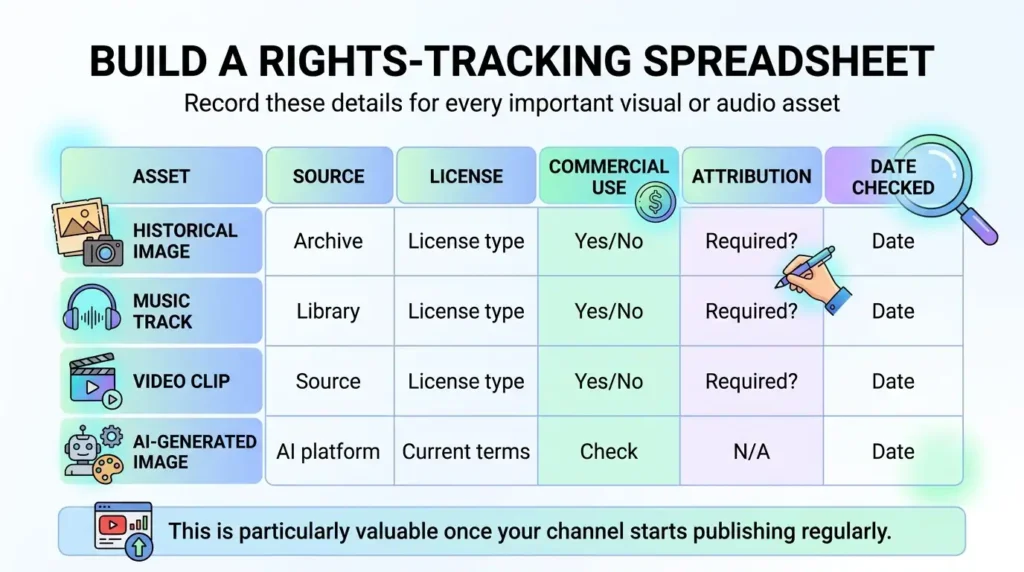
You don’t want to discover months later that you cannot remember where a particular image came from.
“Royalty-free” does not necessarily mean:
“Use it however you want.”
A royalty-free asset can still have conditions.
For example, a license may restrict:
Always read the current license.
The same principle applies to AI-generated content.
When evaluating AI tools for faceless YouTube channels, don’t look only at:
“How realistic is the output?”
“Can I legally use this output in my business?”
AI platforms can change their pricing and terms.
Therefore, record the date you checked the relevant terms.
Don’t ignore background music.
A documentary can use music throughout the entire video, which means one licensing mistake can affect many uploads.
Use properly licensed music or an appropriate music library.
Don’t assume that a track is safe simply because another YouTube creator is using it.
The cost depends heavily on the workflow.
There is no universal price.
One creator may use mostly free tools.
Another may subscribe to several premium AI services.
A third may spend more on professional narration, visuals, editing, music, and research.
That’s why you should think about the cost per finished video, not just the monthly subscription price.
The financial cost can be relatively low.
The tradeoff is time.
You may spend considerably more time doing manual work.
This increases monthly expenses but can reduce production time.
At this level, the channel begins to resemble a small media operation rather than a simple side project.
Suppose you have several monthly subscriptions.
Don’t simply say:
“My AI tools cost $100 per month.”
Ask:
How many videos do those tools help me produce?
For example:
If your monthly production expenses are $120 and you produce 12 finished videos:
$120 ÷ 12 = $10 per video
But that still doesn’t include your time.
Now consider:
Your true production cost includes both cash expenses and labor.
Monthly Software Cost + Asset Cost + Other Production Costs ÷ Number of Finished Videos = Approximate Cash Cost Per Video
Production Hours × Your Target Hourly Value = Time Cost
This gives you a much more realistic picture.
For example, a video might cost only $8 in software and assets but require six hours of work.
Another workflow might cost $25 but reduce production time to three hours.
The second workflow could actually be more efficient.
That is why the cheapest tool is not always the best tool.
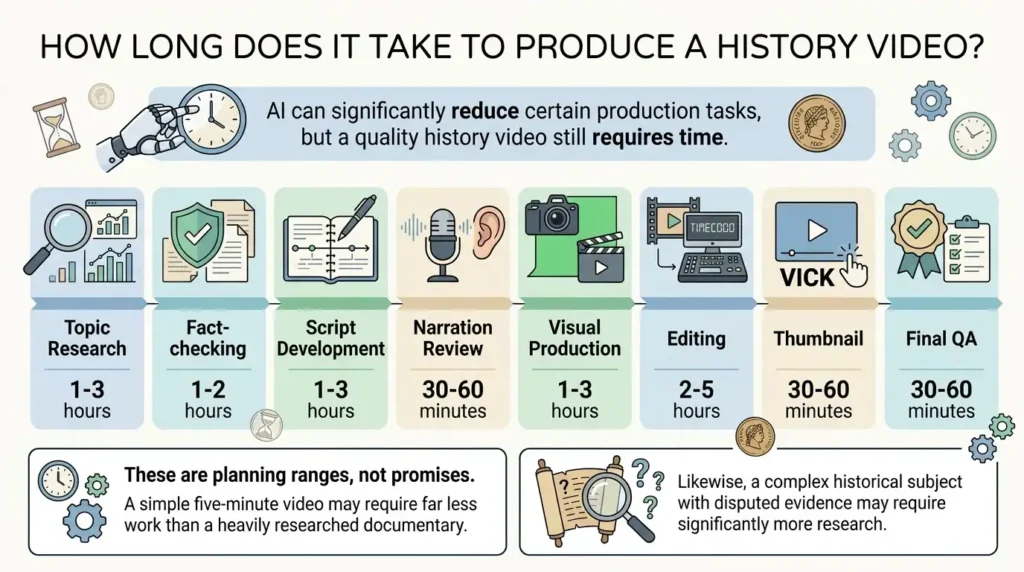
AI can significantly reduce certain production tasks, but a quality history video still requires time.
| Production Stage | Approximate Time |
| Topic research | 1–3 hours |
| Fact-checking | 1–2 hours |
| Script development | 1–3 hours |
| Narration review | 30–60 minutes |
| Visual production | 1–3 hours |
| Editing | 2–5 hours |
| Thumbnail | 30–60 minutes |
| Final QA | 30–60 minutes |
These are planning ranges, not promises.
A simple five-minute video may require far less work than a heavily researched documentary.
Likewise, a complex historical subject with disputed evidence may require significantly more research.
“How quickly can AI make a video?”
“How efficiently can I create a video that viewers actually want to watch?”
There is a huge difference.
If you reduce production time from eight hours to two hours but viewer retention collapses, you did not necessarily improve your business.
You simply produced weaker content faster.
Then optimize the workflow.
Once you have produced several videos, stop reinventing the process every time.
Create templates.
For example, build a reusable research template containing:
Then create a reusable script template.
Then create a narration workflow.
Then create a visual checklist.
Then create an editing template.
Finally, create a publishing checklist.
This turns AI tools for faceless YouTube channels from a collection of software into an actual production system.
The final workflow can look like this:
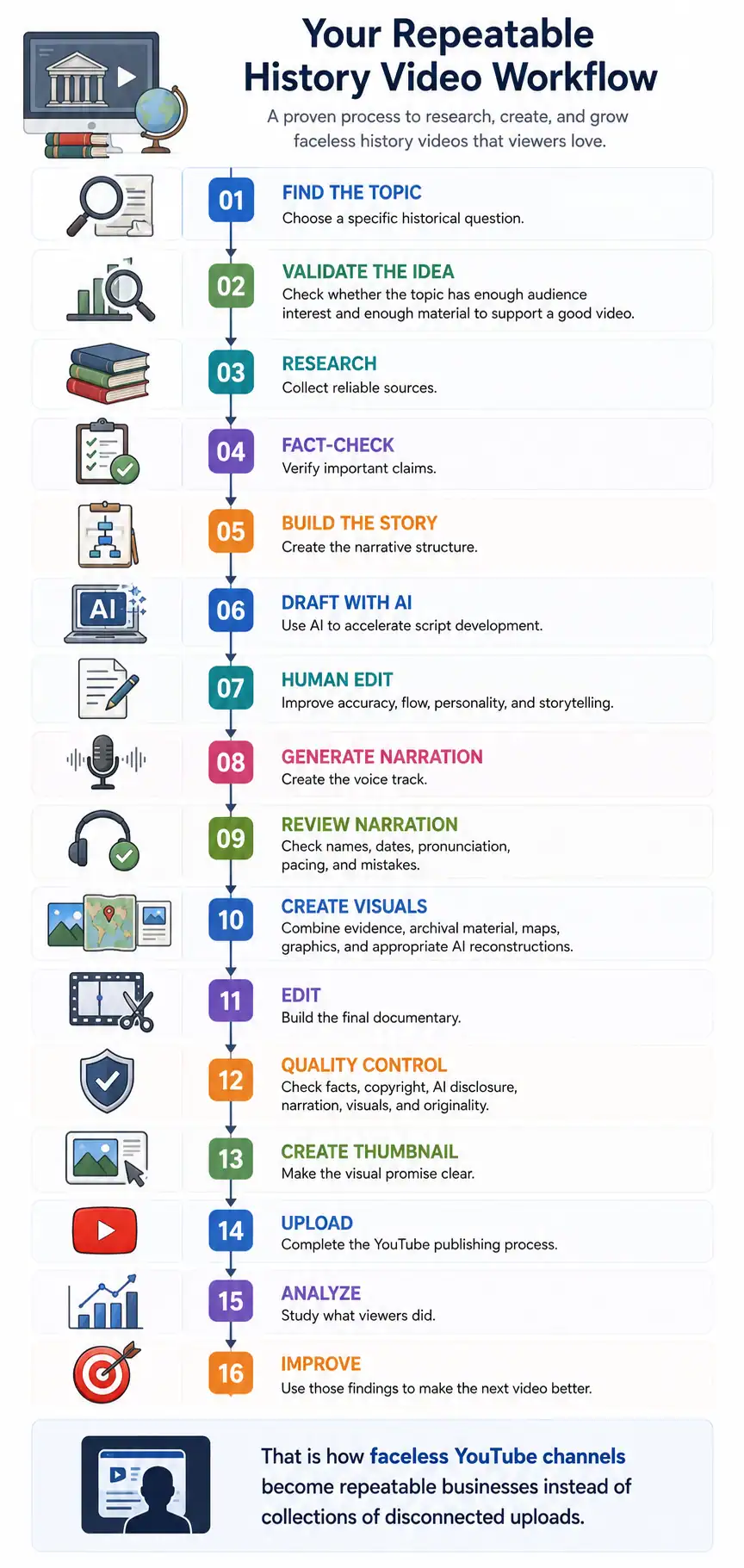
Choose a specific historical question.
Check whether the topic has enough audience interest and enough material to support a good video.
Collect reliable sources.
Verify important claims.
Create the narrative structure.
Use AI to accelerate script development.
Improve accuracy, flow, personality, and storytelling.
Create the voice track.
Check names, dates, pronunciation, pacing, and mistakes.
Combine evidence, archival material, maps, graphics, and appropriate AI reconstructions.
Build the final documentary.
Check facts, copyright, AI disclosure, narration, visuals, and originality.
Make the visual promise clear.
Complete the YouTube publishing process.
Study what viewers did.
Use those findings to make the next video better.
That is how faceless YouTube channels become repeatable businesses instead of collections of disconnected uploads.
Don’t expect your first video to be perfect.
Your first videos are data.
Pay attention to:
Click-Through Rate
Audience Retention
Average View Duration
This helps you understand whether viewers are consuming meaningful portions of your content.
Traffic Sources
Subscriber Conversion
Ask:
Did this video give viewers a reason to subscribe?
A video can receive views without building a loyal audience.
A new channel may take time to establish an audience.
One video can underperform for many reasons.
Don’t immediately conclude:
“History doesn’t work.”
Instead, investigate.
The purpose of analytics is not simply to celebrate successful videos.
It’s to understand why something happened.
Your production process should eventually become:
Publish
↓
Measure
↓
Analyze
↓
Identify weakness
↓
Improve workflow
↓
Publish better video
This is one of the most important advantages of building a channel systematically.
Every video can improve the next one.
You don’t need to create 100 videos before launching.
Start small.
The goal of the first month is to validate the workflow.
Then create a list of at least 10 potential topics.
Choose your first topic.
Create one or two test videos.
Don’t try to build a perfect production studio.
Document the process.
Publish consistently according to a schedule you can realistically maintain.
Don’t choose a schedule that requires you to produce seven high-quality documentaries every week if you are working alone.
Consistency is useful.
Sustainability is better.
Review your first videos.
Then adjust your workflow.
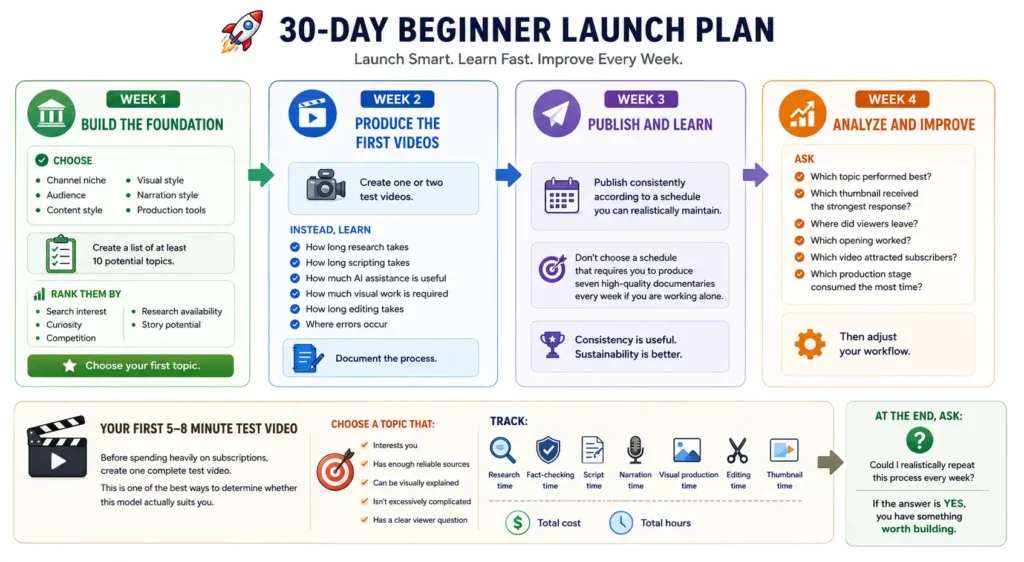
Before spending heavily on subscriptions, create one complete test video.
This is one of the best ways to determine whether this model actually suits you.
Then take the video through the complete process.
Track:
Research time
Fact-checking time
Script time
Narration time
Visual production time
Editing time
Thumbnail time
Total cost
Total hours
At the end, ask:
Could I realistically repeat this process every week?
If the answer is yes, you have something worth building.
AI can generate endless ideas.
That doesn’t mean those ideas have an audience.
AI can be wrong.
Always verify important historical claims.
Study successful channels.
Don’t reproduce their:
Learn from competitors without becoming a clone.
Templates save time.
But excessive repetition can make a channel feel mass-produced.
Change the storytelling approach when the subject requires it.
A beautiful image can still be historically inaccurate.
“Everyone else uses it” is not a copyright strategy.
AI makes it easy to create content.
That can make it tempting to skip quality control.
Don’t.
A new channel may generate no meaningful revenue for some time.
Avoid promises such as:
“Start a history channel and make $10,000 per month.”
Revenue varies widely based on audience, geography, content quality, monetization eligibility, advertiser demand, and many other factors.
Policies can change.
Check the current official documentation before making important decisions about monetization, AI disclosure, copyright, or advertiser suitability.
The viewer doesn’t care which AI tool generated your image.
Always optimize for the viewer first.
A YouTube channel does not have to depend entirely on advertising revenue.
In fact, building multiple revenue streams can make the business more resilient.
The key is to choose monetization methods that naturally fit the audience.
Once eligible and accepted into the relevant YPP monetization features, advertising can become one revenue source.
But don’t calculate your future income simply by multiplying views by a guessed RPM.
Actual earnings can vary significantly.
Treat advertising as one part of the business rather than a guaranteed paycheck.
This is where AI tools for faceless YouTube channels can connect naturally with your Make Money Online business model.
But don’t turn every video into an advertisement.
A better approach is:
Problem → Explanation → Solution → Tool → Disclosure
For example:
You need consistent narration across 20 videos.
Explain why voice consistency matters.
Then discuss the types of tools that solve the problem.
Then recommend an appropriate tool.
That is more useful than simply saying:
“Buy this AI voice generator.”
Once you understand the production workflow, you can package your knowledge.
Potential products include:
Faceless YouTube Launch Checklist
A step-by-step launch document.
AI History Script Template
A reusable research-to-script framework.
YouTube Production Spreadsheet
AI Tool Comparison Spreadsheet
Video Production Cost Calculator
Help creators calculate their approximate cost per finished video.
These products can eventually create revenue without requiring another YouTube view.
Your channel can also become the top of a content funnel.
YouTube Video
Free Faceless YouTube Checklist
Email Subscriber
Useful Creator Resources
Relevant Affiliate Recommendations
Digital Product
This is especially relevant for a Make Money Online website because the YouTube channel and website can support each other.
Once the channel develops a defined audience, companies may become interested in reaching that audience.
But sponsorships should fit the audience.
A random product can damage viewer trust.
This is one of the most important rules.
The sequence should be:
Audience
Trust
Useful content
Engagement
Monetization
Not:
Affiliate link
Video
Viewer
The audience should feel that the monetization method is a natural extension of the content.
Before publishing every video, run this checklist.
The long-term model is simple:
Research
Original story
AI-assisted production
Human quality control
Useful video
Audience trust
Analytics
Better content
Larger audience
Multiple revenue streams
This is much more sustainable than trying to create as many AI videos as possible.
The purpose of AI tools for faceless YouTube channels should be to make a good creator more efficient.
Not to make a content farm more productive.
If you’re starting from zero, don’t worry about building a massive channel immediately.
Start with one niche.
Choose one specific historical question.
Research it properly.
Verify your sources.
Use AI to help organize the research and develop the first script.
Edit the script yourself.
Create appropriate narration.
Combine archival material, maps, graphics, and carefully reviewed AI-generated visuals.
Edit the video.
Run your quality-control checklist.
Review YouTube’s current disclosure requirements.
Publish.
Then study what happens.
Your first goal is not to make a fortune.
Your first goal is to prove that you can consistently create a video that people want to watch.
Once you’ve proven that, you can improve the system.
You can create better templates.
You can reduce production time.
You can improve your thumbnails.
You can develop stronger hooks.
You can build a content library.
You can add affiliate recommendations.
You can create digital products.
And eventually, you can turn the channel into one component of a larger online business.
Once your production workflow is ready, the next challenge is finding topics.
Here are 30 directions you can develop into full videos.
The best ideas are not necessarily the most famous.
Look for the combination of:
Interesting question + reliable evidence + strong narrative + visual potential + audience demand.
That formula gives you a much stronger starting point for faceless YouTube channels than simply asking AI for 100 random video topics.
At this point, you have the essential framework:
Choose a niche
Find a compelling question
Research reliable sources
Fact-check
Create the narrative
Use AI to accelerate production
Add human judgment
Create accurate and relevant visuals
Edit for retention
Check copyright
Check AI disclosure
Run quality control
Publish
Analyze
Improve
Monetize responsibly
That is the foundation of a sustainable AI-assisted history channel.
But there is still one important piece missing.
You need a repeatable content strategy that tells you what to publish, how to structure the channel, how to plan your first month, how to create stronger thumbnails and titles, and how to connect the channel with your broader Make Money Online ecosystem.
The next section brings all of those pieces together into a practical launch system.
How to Build a Content Strategy for Faceless YouTube Channels
Creating one good video is an achievement.
Creating good videos consistently is a business.
That is where your content strategy becomes more important than the individual AI tools for faceless YouTube channels you use.
You can have an impressive AI video generator, realistic voice software, excellent image generation, and a powerful editing system.
But none of those tools can answer the most important question:
What should you publish next?
A sustainable channel needs a repeatable answer.
Your strategy should connect four things:
Audience demand → Topic → Story → Packaging
If those four elements work together, your production system becomes much more predictable.
Before publishing dozens of videos, define what your channel promises.
A good channel promise should tell viewers:
“We explain the hidden stories, mysteries, inventions, and decisions that shaped history.”
That is stronger than:
“History videos every week.”
The first statement describes a viewer experience.
The second only describes an upload schedule.
Instead of publishing random historical topics, divide your channel into several content pillars.
For example:
Topics about people, places, events, and stories that have been overlooked.
Unsolved questions, disputed events, lost locations, unexplained discoveries, and competing theories.
What ordinary people ate, bought, wore, built, feared, and experienced.
The development of tools, machines, systems, transportation, communication, and other innovations.
Trade, money, companies, industries, entrepreneurs, markets, and economic decisions.
This structure gives you variety without making the channel feel random.
It also makes it easier to discover which category your audience responds to most strongly.
A simple starting framework is:
70% proven content
Topics closely related to subjects that already perform well.
20% adjacent experiments
New angles that still fit your audience.
10% high-risk experiments
Completely new ideas that could potentially become major winners.
For example, if your audience responds strongly to historical mysteries:
70%
More historical mysteries.
20%
Historical technology, forgotten places, and unusual discoveries.
10%
A completely different storytelling experiment.
This prevents the channel from becoming too repetitive while still maintaining a recognizable identity.
Don’t search for a new idea every time you’re ready to make a video.
Create a database.
Your spreadsheet can contain:
| Topic | Pillar | Main Question | Search Potential | Curiosity | Visual Potential | Status |
| Lost city | Mystery | What happened? | High | High | High | Research |
| Ancient food | Everyday | What did people eat? | Medium | High | High | Idea |
| Forgotten invention | Technology | Why did it disappear? | High | High | High | Planned |
Add more columns as your channel grows.
This turns content planning into a system rather than a guessing game.
Don’t rely on one keyword tool.
Use several signals.
Type a broad phrase into YouTube and observe the suggestions.
Autocomplete can reveal how people phrase questions.
Once your channel has an audience, YouTube Analytics can show what your viewers are watching outside your channel and help identify patterns for future topics.
Look at channels serving a similar audience.
Don’t copy their videos.
Study:
Look for questions people repeatedly ask.
Forums, discussion communities, comments, and social platforms can reveal questions that formal keyword tools sometimes miss.
The goal is to find the intersection between:
What people want to know
and
What you can explain better.
SEO keywords tell you what someone typed.
They don’t always tell you the entire psychological reason behind the search.
For example:
Keyword:
“Roman roads”
The deeper questions could be:
Those questions create better video concepts.
This is especially useful for AI tools for faceless YouTube channels because AI can generate hundreds of keyword variations, but you still need to determine which question creates the strongest story.
A curiosity gap exists when the viewer knows enough to understand the question but not enough to know the answer.
For example:
“This city was once one of the most important trading centers in the region. Then something happened that changed its future.”
The viewer naturally asks:
What happened?
The rest of the video becomes the answer.
Use curiosity carefully.
Don’t create fake mysteries.
The payoff must actually satisfy the question.
The Title Should Make a Promise
Your title is not a summary of your research.
It is a promise to the viewer.
YouTube itself recommends titles that are accurate and succinct, with important words toward the beginning. It also distinguishes between searchable titles and intriguing titles designed to create curiosity.
Consider these two approaches.
Searchable
How Roman Roads Were Built
Curiosity-Driven
Why Roman Roads Lasted for Centuries
Both can work.
The better choice depends on your audience and discovery source.
For your content database, create both.
Search Title
Designed around a clear question or keyword.
Example:
How Ancient Roman Roads Were Actually Built
Browse Title
Designed around curiosity.
Example:
The Engineering Trick That Made Roman Roads Last
Then choose based on the video and intended discovery path.
YouTube recommends considering whether your audience is likely to discover the video through search or through browsing when deciding between searchable and intriguing titles.
A strong title creates curiosity.
A misleading title creates disappointment.
That distinction matters.
If the title promises:
“The Forgotten Machine That Changed Farming Forever”
the video needs to explain that machine and its significance.
Don’t spend the first five minutes discussing unrelated history.
YouTube’s guidance emphasizes that the title and thumbnail should accurately represent the video.
A thumbnail should not explain the entire video.
It should communicate one visual idea.
YouTube recommends keeping thumbnails clear and not overly complex, while ensuring text remains readable across devices.
Think of them as a two-part message.
Thumbnail
Creates the visual question.
Title
Adds the verbal context.
For example:
Thumbnail:
A mysterious abandoned city.
Title:
Why Did This Ancient City Suddenly Disappear?
The two elements create one promise.
Don’t repeat exactly the same information in both.
YouTube currently provides an A/B testing feature that can compare up to three title and thumbnail combinations for eligible long-form videos. The winning combination is selected based on watch time rather than simply clicks.
This is extremely useful.
Instead of arguing about which thumbnail is better, let viewer behavior provide evidence when the feature is available to your channel.
Test meaningful differences.
Version A
Historical artifact + short title text.
Version B
Historical figure + emotional expression.
Version C
Mystery scene + question.
Then compare the results.
The opening is where the viewer decides whether the video deserves more time.
YouTube’s retention guidance specifically highlights the first 30 seconds and whether the content matches the expectation created by the title and thumbnail.
That means your opening should not waste time.
Avoid:
“Hello everyone, welcome back to the channel.”
Avoid:
“In today’s video, we’re going to be talking about…”
Avoid:
“History is full of fascinating stories…”
Instead, get into the story.
A useful structure is:
0–5 Seconds
Present the surprising fact, question, or situation.
5–15 Seconds
Explain why it matters.
15–30 Seconds
Create the central mystery or promise.
Then begin the story.
“For centuries, people believed this city had simply vanished. But the evidence tells a much stranger story.”
Then immediately begin explaining the evidence.
The hook should deliver what the title and thumbnail promised.
An open loop creates an unanswered question.
For example:
“But that wasn’t the strangest thing archaeologists discovered.”
The viewer wants to know what comes next.
Use this technique occasionally.
Don’t turn every paragraph into:
“But there’s more…”
That quickly becomes predictable.
Instead, build natural narrative tension.
For a 10 – 20 minute documentary, chapters can help viewers understand the progression.
A simple structure might be:
Hook
The World Before
The Main Event
The Turning Point
What the Evidence Shows
The Mystery
What Happened Next
What We Know Today
This is much more engaging than:
Fact 1
Fact 2
Fact 3
Fact 4
Even a strong story can become visually repetitive.
Change the visual language periodically.
Narration
Historical photograph
Animated map
AI reconstruction
Document close-up
Timeline
Diagram
Archival image
Reconstruction
The viewer’s brain receives new visual information while the narrative continues.
One of the biggest mistakes with AI tools for faceless YouTube channels is assuming that every second needs AI-generated video.
It doesn’t.
The best format depends on the story.
AI-generated motion should solve a visual problem.
It shouldn’t exist simply because the tool can generate it.
Your channel should become recognizable.
Choose a general visual language.
But don’t make every video identical.
You want:
Brand consistency + content variation
not:
Template repetition
That distinction is particularly important because YouTube’s current monetization policy warns against highly repetitive or mass-produced content where videos feel interchangeable.
But the substance should change.
YouTube explicitly says similar content can still be monetizable when each video has materially different substance and provides creative, educational, or other value.
So a series is fine.
A clone factory is not.
A series can help viewers know what to expect.
For example:
Episode 1: A Lost Trading Center
Episode 2: The City Buried by Disaster
Episode 3: The Settlement Abandoned by Its People
Episode 1: The Machine That Changed Agriculture
Episode 2: The Ancient Device Nobody Expected
Episode 3: The Technology That Disappeared
The format stays recognizable.
The story changes.
Your channel can have three levels.
Designed to attract new viewers.
Designed to deepen engagement.
Designed for your strongest viewers.
This gives your audience a path from casual viewer to loyal subscriber.
Short-form content can introduce people to your long-form channel.
For example, a long documentary about an ancient invention could produce several Shorts:
Short 1:
The surprising problem the invention solved.
Short 2:
The strange detail most people don’t know.
Short 3:
The historical misconception.
Then point interested viewers toward the full documentary.
Don’t assume every Short viewer will automatically become a long-form viewer.
The content needs to make the connection obvious.
Here’s a practical starting schedule.
Video 1
A broad, high-interest historical question.
Video 2
A mystery or surprising historical story.
Short 1
A fact from Video 1.
Short 2
A fact from Video 2.
Video 3
A technology or invention story.
Video 4
An everyday-life history topic.
Short 3
A surprising detail from Video 3.
Short 4
A visual comparison from Video 4.
Video 5
A forgotten person or place.
Video 6
A deeper historical mystery.
Short 5
A question from Video 5.
Short 6
A surprising historical claim from Video 6.
Video 7
A topic related to your best-performing video.
Video 8
A new experiment.
Short 7
A highlight from Video 7.
Short 8
A highlight from Video 8.
At the end of the month, compare all eight videos.
Don’t simply choose the video with the most views.
Study:
Then build the next month’s calendar around what you learned.
Before producing a video, score each idea from 1–5.
Audience Demand
Does the subject have evidence of viewer interest?
Curiosity
Does the topic create a strong question?
Story Potential
Can you build a beginning, middle, and end?
Visual Potential
Can you find or create enough visuals?
Research Quality
Are reliable sources available?
Competition
Can you create a meaningful angle rather than copying existing videos?
Monetization Fit
Does the topic fit your broader business strategy?
Add the scores.
A high-scoring topic deserves priority.
SEO is useful.
But don’t treat YouTube like a traditional blog search engine.
The most important objective is still creating a video that viewers choose and continue watching.
YouTube’s current guidance emphasizes titles, thumbnails, descriptions, audience understanding, engagement, and viewer response. It also notes that tags are primarily useful for common spelling mistakes rather than being essential for discovery.
That means your optimization strategy should focus on:
Search intent + viewer satisfaction
not keyword stuffing.
For this article’s topic, the primary keyword is:
AI tools for faceless YouTube channels
But don’t force the exact phrase into every paragraph.
Natural language is better for readers and search systems.
The goal is topical coverage.
Don’t write a keyword-stuffed paragraph.
Write for the viewer first.
For longer videos, chapters can help viewers navigate.
The chapter names should help viewers understand the story.
This is where your YouTube content can become part of a larger Make Money Online ecosystem.
Your website can support the channel.
The channel can support the website.
Think of the relationship as:
YouTube
Website article
Free resource
Email subscriber
Relevant tools/products
For example, a YouTube video about creating a faceless channel could direct viewers to a detailed website guide about the AI tools for faceless YouTube channels.
This creates multiple opportunities for monetization.
Instead of publishing disconnected articles, create a topical cluster.
Your pillar page could target:
AI Tools for Faceless YouTube Channels
Supporting articles could cover:
AI Research Tools
How to research topics faster.
AI Script Writing Tools
How to create and edit scripts.
AI Voice Tools
How to produce narration.
AI Image Generators
How to create visuals.
AI Video Generators
How to create motion.
AI Thumbnail Tools
How to create better packaging.
Faceless YouTube Automation
How to build the entire workflow.
YouTube Monetization
How to build multiple revenue streams.
YouTube Copyright
How to manage media rights.
AI Disclosure
How to handle synthetic content responsibly.
This creates a strong topical structure.
Don’t write:
“Click here.”
Instead, connect the link to the reader’s next question.
For example:
“If you’re still choosing your production stack, compare the best AI tools for faceless YouTube channels before subscribing to multiple platforms.”
That makes the internal link useful rather than decorative.
If your website is focused on Make Money Online, a lead magnet can turn traffic into an audience you own.
The best lead magnet solves a problem immediately.
A simple funnel could be:
YouTube Video
Website Article
Free Checklist
Email Signup
Useful Educational Emails
Relevant Affiliate Tools
Premium Digital Product
This is much stronger than relying only on YouTube advertising.
Imagine someone watches:
“How to Build a Faceless History YouTube Channel With AI”
At the end, you tell them:
“If you want the complete production workflow, I’ve created a free faceless YouTube checklist.”
The viewer visits your website.
The page explains the process.
They download the checklist.
They join your email list.
You have now converted a YouTube viewer into an owned audience member.
Affiliate marketing works best when recommendations are credible.
If you test ten AI voice tools, don’t recommend all ten simply because they offer affiliate programs.
Your reputation is worth more than one commission.
The AI ecosystem changes quickly.
YouTube policies can also change.
That means an article about AI tools for faceless YouTube channels should not be treated as permanent.
Create a maintenance system.
Every 30–90 Days
Then update the content.
This is particularly important in the Make Money Online niche.
Avoid claims such as:
“This method will make you $500 per day.”
Instead:
“This model can create several potential revenue streams, but results vary based on audience, content quality, traffic, monetization, and execution.”
That language is more credible.
It also creates a better long-term relationship with your audience.
AI should not replace your judgment.
It should multiply it.
Imagine that before AI, you could comfortably research and produce one strong video per week.
With a well-designed AI-assisted workflow, perhaps you can produce two without sacrificing quality.
That’s leverage.
But if AI lets you produce ten low-quality videos instead of one good one, you haven’t necessarily built a better business.
You’ve built a faster content machine.
Those are not the same thing.
Don’t ask:
“What are the best AI tools?”
Ask:
“What is slowing down my production?”
If research is slow:
Find a better research workflow.
If scripting is slow:
Improve your prompting and editing system.
If narration is slow:
Use a reliable voice workflow.
If visuals are slow:
Build reusable visual templates.
If editing is slow:
Create project templates and automation.
If thumbnails are slow:
Build a repeatable thumbnail system.
This approach keeps you from subscribing to tools you don’t actually need.
A beginner does not need a giant software stack.
Start with categories:
For discovering and organizing reliable information.
For outlines, drafts, editing, and restructuring.
For narration.
For visual reconstruction and creative assets.
For animation and generated footage where appropriate.
For assembling the final video.
For packaging.
For understanding audience behavior.
Start with one tool per major bottleneck.
Expand only when the workflow proves that you need it.
Once the channel becomes consistent, you can build a more sophisticated workflow.
Research Database
AI Research Assistant
Fact-Checking System
Script Generator
Human Editorial Review
AI Narration
Visual Generation
Asset Management
Video Editing Template
Thumbnail Generation
SEO and Publishing Checklist
Analytics Dashboard
Content Feedback Loop
This is the point where your channel starts functioning like a small media operation.
If you work on the channel part-time, try a batch system.
Monday — Research
Choose topics and collect sources.
Tuesday — Script
Build outlines and draft scripts.
Wednesday — Narration and Visuals
Generate voice and create assets.
Thursday — Editing
Assemble the videos.
Friday — Thumbnail and Publishing
Create packaging and publish.
Weekend — Analytics and Planning
Review performance and prepare the next topics.
You can adjust this based on your schedule.
The principle is more important than the exact days:
Batch similar tasks together.
Switching constantly between research, writing, editing, thumbnail design, and analytics creates friction.
Instead:
Research five topics
Outline five videos
Script two or three
Generate narration
Create visual assets
Edit
This can make the workflow more efficient.
But don’t batch so aggressively that you lose the individuality of each video.
Eventually, you may reach a point where your time becomes the biggest bottleneck.
Then outsourcing may make sense.
But don’t outsource blindly.
Create your process first.
Then another person can follow the system.
Create an SOP for each major stage.
These documents eventually become an operating system for your channel.
Once you’ve completed your initial testing period, think in three phases.
Goal:
Find what works.
Don’t obsess over revenue.
Identify your strongest patterns.
If historical mysteries outperform general history, create more mysteries.
If short documentaries outperform long documentaries, investigate why.
If one thumbnail format consistently performs better, refine it.
Use evidence.
Your goal is to make the process repeatable.
Success isn’t simply:
More views.
A healthy channel should gradually improve across several dimensions.
Content Quality
Your videos become better.
Production Efficiency
You spend less time creating each video.
Viewer Satisfaction
People watch longer.
Audience Growth
Subscribers increase.
Returning Viewers
People come back for additional videos.
Revenue
Multiple monetization sources begin developing.
Brand
People recognize your channel.
That’s a much stronger definition of success than chasing one viral upload.
The technology is not the business.
The business is:
Audience + Content + Trust + Distribution + Monetization
AI simply changes how efficiently you can produce the content.
That distinction will become increasingly important as more creators gain access to powerful generation tools.
If everyone can generate a realistic voice, realistic images, and polished videos, those capabilities stop being a competitive advantage by themselves.
Before launching your faceless YouTube channels, make sure you can answer “yes” to these questions.
If you can check most of these boxes, you’re ready to start.
Technically, AI can assist with almost every production stage.
But that doesn’t mean you should remove human involvement.
A stronger model is to use AI for research organization, scripting assistance, narration, visuals, editing assistance, and other repetitive tasks while keeping human control over topic selection, fact-checking, storytelling, originality, and final quality.
They can be.
But the opportunity is no longer simply about hiding your face.
The real opportunity is building a recognizable content brand without requiring the creator to appear on camera.
AI use by itself does not automatically make a channel ineligible.
However, YouTube’s current monetization policy emphasizes original and authentic content and identifies repetitive or mass-produced content as inauthentic.
Therefore, an AI-assisted channel should focus on meaningful original value rather than mass-producing nearly identical videos.
YouTube currently requires creators to disclose AI when it meaningfully alters or generates realistic content in ways that could mislead viewers, such as generating a realistic scene that did not actually happen.
Not every use of AI requires disclosure.
If you’re uncertain about a specific use case, check YouTube’s current disclosure guidance before publishing.
No.
YouTube’s current guidance says disclosure itself does not limit a video’s audience or its eligibility to earn money.
The underlying content still needs to comply with YouTube’s monetization and other policies.
There is no reliable universal number.
Anyone guaranteeing a specific income level should be treated cautiously.
There is no magic number.
Choose a schedule you can maintain without destroying quality.
For a solo creator, one or two strong long-form videos per week may be more sustainable than producing seven low-quality videos.
Both can work.
The right choice depends on your audience and brand.
They can be useful for reconstructions and visual storytelling.
But they should not automatically be treated as historical evidence.
AI images can introduce inaccurate clothing, architecture, weapons, geography, objects, and other details.
Review them carefully.
A consistent channel format is fine.
The substance should still vary meaningfully.
YouTube’s current monetization guidance specifically says similar content can be acceptable when the substance is materially different and provides creative, educational, or other value.
There isn’t one universal winner.
The best tool is the one that solves your biggest bottleneck.
If research is your problem, prioritize research.
If narration is your problem, prioritize voice.
If editing takes too long, improve your editing workflow.
Don’t build your business around a tool list.
Build it around a workflow.
The opportunity behind AI tools for faceless YouTube channels isn’t simply that artificial intelligence can create videos faster.
The bigger opportunity is that one person can now perform many tasks that previously required an entire production team.
Research can be accelerated.
Scripts can be drafted.
Narration can be generated.
Visual concepts can be created.
Editing can become more efficient.
Thumbnails can be developed faster.
Content can be repurposed.
And analytics can help guide future decisions.
But technology alone does not create a successful channel.
The creators who build sustainable faceless YouTube channels will be the ones who combine AI efficiency with human judgment.
Research before generating.
Verify before publishing.
Tell a better story.
Create original value.
Respect copyright.
Disclose qualifying synthetic content.
Study viewer behavior.
Improve every upload.
And build revenue streams that go beyond advertising.
Most importantly, don’t think of AI as a shortcut around quality.
Think of it as leverage.
The goal isn’t to create more videos simply because AI makes them easier to produce.
The goal is to create better videos, more efficiently, for an audience that genuinely wants to watch them.
That is the foundation of a faceless YouTube business that can grow beyond a collection of automated uploads and become a real digital media asset.